
-
admin wrote a new post 4 weeks ago
RCS Business Messaging Use Cases By Industry
 Messaging has become one of the most important ways organisations communicate with customers, […]
 -
admin wrote a new post 4 weeks ago
Generative AI vs Agentic AI: From Creating Content to Taking ActionThe last two years were defined by a single word: Generative AI. Tools like […]
-
admin wrote a new post 4 weeks ago
A Coding Implementation to Design an Enterprise AI Governance System Using OpenClaw Gateway Policy Engines, Approval Workflows and Auditable Agent ExecutionIn this tutorial, we build an enterprise-grade AI governance system using OpenClaw and Python. We start by setting up the OpenClaw runtime and launching the OpenClaw Gateway so that our Python environment can interact with a real agent through the OpenClaw API. We then design a governance layer that classifies requests based on risk, enforces approval policies, and routes safe tasks to the OpenClaw agent for execution. By combining OpenClaw’s agent capabilities with policy controls, we demonstrate how organizations can safely deploy autonomous AI systems while maintaining visibility, traceability, and operational oversight. Copy CodeCopiedUse a different Browser!apt-get update -y !apt-get install -y curl !curl -fsSL https://deb.nodesource.com/setup_22.x | bash – !apt-get install -y nodejs !node -v !npm -v !npm install -g openclaw@latest !pip -q install requests pandas pydantic import os import json import time import uuid import secrets import subprocess import getpass from pathlib import Path from typing import Dict, Any from dataclasses import dataclass, asdict from datetime import datetime, timezone import requests import pandas as pd from pydantic import BaseModel, Field try: from google.colab import userdata OPENAI_API_KEY = userdata.get(“OPENAI_API_KEY”) except Exception: OPENAI_API_KEY = None if not OPENAI_API_KEY: OPENAI_API_KEY = os.environ.get(“OPENAI_API_KEY”) if not OPENAI_API_KEY: OPENAI_API_KEY = getpass.getpass(“Enter your OpenAI API key (hidden input): “).strip() assert OPENAI_API_KEY != “”, “API key cannot be empty.” OPENCLAW_HOME = Path(“/root/.openclaw”) OPENCLAW_HOME.mkdir(parents=True, exist_ok=True) WORKSPACE = OPENCLAW_HOME / “workspace” WORKSPACE.mkdir(parents=True, exist_ok=True) GATEWAY_TOKEN = secrets.token_urlsafe(48) GATEWAY_PORT = 18789 GATEWAY_URL = f”http://127.0.0.1:{GATEWAY_PORT}” We prepare the environment required to run the OpenClaw-based governance system. We install Node.js, the OpenClaw CLI, and the required Python libraries so our notebook can interact with the OpenClaw Gateway and supporting tools. We also securely collect the OpenAI API key via a hidden terminal prompt and initialize the directories and variables required for runtime configuration. Copy CodeCopiedUse a different Browserconfig = { “env”: { “OPENAI_API_KEY”: OPENAI_API_KEY }, “agents”: { “defaults”: { “workspace”: str(WORKSPACE), “model”: { “primary”: “openai/gpt-4.1-mini” } } }, “gateway”: { “mode”: “local”, “port”: GATEWAY_PORT, “bind”: “loopback”, “auth”: { “mode”: “token”, “token”: GATEWAY_TOKEN }, “http”: { “endpoints”: { “chatCompletions”: { “enabled”: True } } } } } config_path = OPENCLAW_HOME / “openclaw.json” config_path.write_text(json.dumps(config, indent=2)) doctor = subprocess.run( [“bash”, “-lc”, “openclaw doctor –fix –yes”], capture_output=True, text=True ) print(doctor.stdout[-2000:]) print(doctor.stderr[-2000:]) gateway_log = “/tmp/openclaw_gateway.log” gateway_cmd = f”OPENAI_API_KEY='{OPENAI_API_KEY}’ OPENCLAW_GATEWAY_TOKEN='{GATEWAY_TOKEN}’ openclaw gateway –port {GATEWAY_PORT} –bind loopback –token ‘{GATEWAY_TOKEN}’ –verbose > {gateway_log} 2>&1 & echo $!” gateway_pid = subprocess.check_output([“bash”, “-lc”, gateway_cmd]).decode().strip() print(“Gateway PID:”, gateway_pid) We construct the OpenClaw configuration file that defines the agent defaults and Gateway settings. We configure the workspace, model selection, authentication token, and HTTP endpoints so that the OpenClaw Gateway can expose an API compatible with OpenAI-style requests. We then run the OpenClaw doctor utility to resolve compatibility issues and start the Gateway process that powers our agent interactions. Copy CodeCopiedUse a different Browserdef wait_for_gateway(timeout=120): start = time.time() while time.time() – start ActionProposal: text = user_request.lower() red_terms = [ “delete”, “remove permanently”, “wire money”, “transfer funds”, “payroll”, “bank”, “hr record”, “employee record”, “run shell”, “execute command”, “api key”, “secret”, “credential”, “token”, “ssh”, “sudo”, “wipe”, “exfiltrate”, “upload private”, “database dump” ] amber_terms = [ “email”, “send”, “notify”, “customer”, “vendor”, “contract”, “invoice”, “budget”, “approve”, “security policy”, “confidential”, “write file”, “modify”, “change” ] if any(t in text for t in red_terms): return ActionProposal( user_request=user_request, category=”high_impact”, risk=”red”, confidence=0.92, requires_approval=True, allow=False, reason=”High-impact or sensitive action detected” ) if any(t in text for t in amber_terms): return ActionProposal( user_request=user_request, category=”moderate_impact”, risk=”amber”, confidence=0.76, requires_approval=True, allow=True, reason=”Moderate-risk action requires human approval before execution” ) return ActionProposal( user_request=user_request, category=”low_impact”, risk=”green”, confidence=0.88, requires_approval=False, allow=True, reason=”Low-risk request” ) def simulated_human_approval(proposal: ActionProposal) -> Dict[str, Any]: if proposal.risk == “red”: approved = False note = “Rejected automatically in demo for red-risk request” elif proposal.risk == “amber”: approved = True note = “Approved automatically in demo for amber-risk request” else: approved = True note = “No approval required” return { “approved”: approved, “reviewer”: “simulated_manager”, “note”: note } @dataclass class TraceEvent: trace_id: str ts: str stage: str payload: Dict[str, Any] We build the governance logic that analyzes incoming user requests and assigns a risk level to each. We implement a classification function that labels requests as green, amber, or red depending on their potential operational impact. We also add a simulated human approval mechanism and define the trace event structure to record governance decisions and actions. Copy CodeCopiedUse a different Browserclass TraceStore: def __init__(self, path=”openclaw_traces.jsonl”): self.path = path Path(self.path).write_text(“”) def append(self, event: TraceEvent): with open(self.path, “a”) as f: f.write(json.dumps(asdict(event)) + “n”) def read_all(self): rows = [] with open(self.path, “r”) as f: for line in f: line = line.strip() if line: rows.append(json.loads(line)) return rows trace_store = TraceStore() def now(): return datetime.now(timezone.utc).isoformat() SYSTEM_PROMPT = “”” You are an enterprise OpenClaw assistant operating under governance controls. Rules: – Never claim an action has been executed unless the governance layer explicitly allows it. – For low-risk requests, answer normally and helpfully. – For moderate-risk requests, propose a safe plan and mention any approvals or checks that would be needed. – For high-risk requests, refuse to execute and instead provide a safer non-operational alternative such as a draft, checklist, summary, or review plan. – Be concise but useful. “”” def governed_openclaw_run(user_request: str, session_user: str = “employee-001”) -> Dict[str, Any]: trace_id = str(uuid.uuid4()) proposal = classify_request(user_request) trace_store.append(TraceEvent(trace_id, now(), “classification”, proposal.model_dump())) approval = None if proposal.requires_approval: approval = simulated_human_approval(proposal) trace_store.append(TraceEvent(trace_id, now(), “approval”, approval)) if proposal.risk == “red”: result = { “trace_id”: trace_id, “status”: “blocked”, “proposal”: proposal.model_dump(), “approval”: approval, “response”: “This request is blocked by governance policy. I can help by drafting a safe plan, a checklist, or an approval packet instead.” } trace_store.append(TraceEvent(trace_id, now(), “blocked”, result)) return result if proposal.risk == “amber” and not approval[“approved”]: result = { “trace_id”: trace_id, “status”: “awaiting_or_rejected”, “proposal”: proposal.model_dump(), “approval”: approval, “response”: “This request requires approval and was not cleared.” } trace_store.append(TraceEvent(trace_id, now(), “halted”, result)) return result messages = [ {“role”: “system”, “content”: SYSTEM_PROMPT}, {“role”: “user”, “content”: f”Governance classification: {proposal.model_dump_json()}nnUser request: {user_request}”} ] raw = openclaw_chat(messages=messages, user=session_user, agent_id=”main”, temperature=0.2) assistant_text = raw[“choices”][0][“message”][“content”] result = { “trace_id”: trace_id, “status”: “executed_via_openclaw”, “proposal”: proposal.model_dump(), “approval”: approval, “response”: assistant_text, “openclaw_raw”: raw } trace_store.append(TraceEvent(trace_id, now(), “executed”, { “status”: result[“status”], “response_preview”: assistant_text[:500] })) return result demo_requests = [ “Summarize our AI governance policy for internal use.”, “Draft an email to finance asking for confirmation of the Q1 cloud budget.”, “Send an email to all employees that payroll will be delayed by 2 days.”, “Transfer funds from treasury to vendor account immediately.”, “Run a shell command to archive the home directory and upload it.” ] results = [governed_openclaw_run(x) for x in demo_requests] for r in results: print(“=” * 120) print(“TRACE:”, r[“trace_id”]) print(“STATUS:”, r[“status”]) print(“RISK:”, r[“proposal”][“risk”]) print(“APPROVAL:”, r[“approval”]) print(“RESPONSE:n”, r[“response”][:1500]) trace_df = pd.DataFrame(trace_store.read_all()) trace_df.to_csv(“openclaw_governance_traces.csv”, index=False) print(“nSaved: openclaw_governance_traces.csv”) safe_tool_payload = { “tool”: “sessions_list”, “action”: “json”, “args”: {}, “sessionKey”: “main”, “dryRun”: False } tool_resp = requests.post( f”{GATEWAY_URL}/tools/invoke”, headers=headers, json=safe_tool_payload, timeout=60 ) print(“n/tools/invoke status:”, tool_resp.status_code) print(tool_resp.text[:1500]) We implement the full governed execution workflow around the OpenClaw agent. We log every step of the request lifecycle, including classification, approval decisions, agent execution, and trace recording. Finally, we run several example requests through the system, save the governance traces for auditing, and demonstrate how to invoke OpenClaw tools through the Gateway. In conclusion, we successfully implemented a practical governance framework around an OpenClaw-powered AI assistant. We configured the OpenClaw Gateway, connected it to Python through the OpenAI-compatible API, and built a structured workflow that includes request classification, simulated human approvals, controlled agent execution, and complete audit tracing. This approach shows how OpenClaw can be integrated into enterprise environments where AI systems must operate under strict governance rules. By combining policy enforcement, approval workflows, and trace logging with OpenClaw’s agent runtime, we created a robust foundation for building secure and accountable AI-driven automation systems. Check out Full Notebook here. Also, feel free to follow us on Twitter and don’t forget to join our 120k+ ML SubReddit and Subscribe to our Newsletter. Wait! are you on telegram? now you can join us on telegram as well. The post A Coding Implementation to Design an Enterprise AI Governance System Using OpenClaw Gateway Policy Engines, Approval Workflows and Auditable Agent Execution appeared first […]
-
admin wrote a new post 4 weeks ago
-
admin wrote a new post 4 weeks, 1 day ago
-
admin wrote a new post 4 weeks, 1 day ago
Zhipu AI Introduces GLM-OCR: A 0.9B Multimodal OCR Model for Document Parsing and Key Information Extraction (KIE)
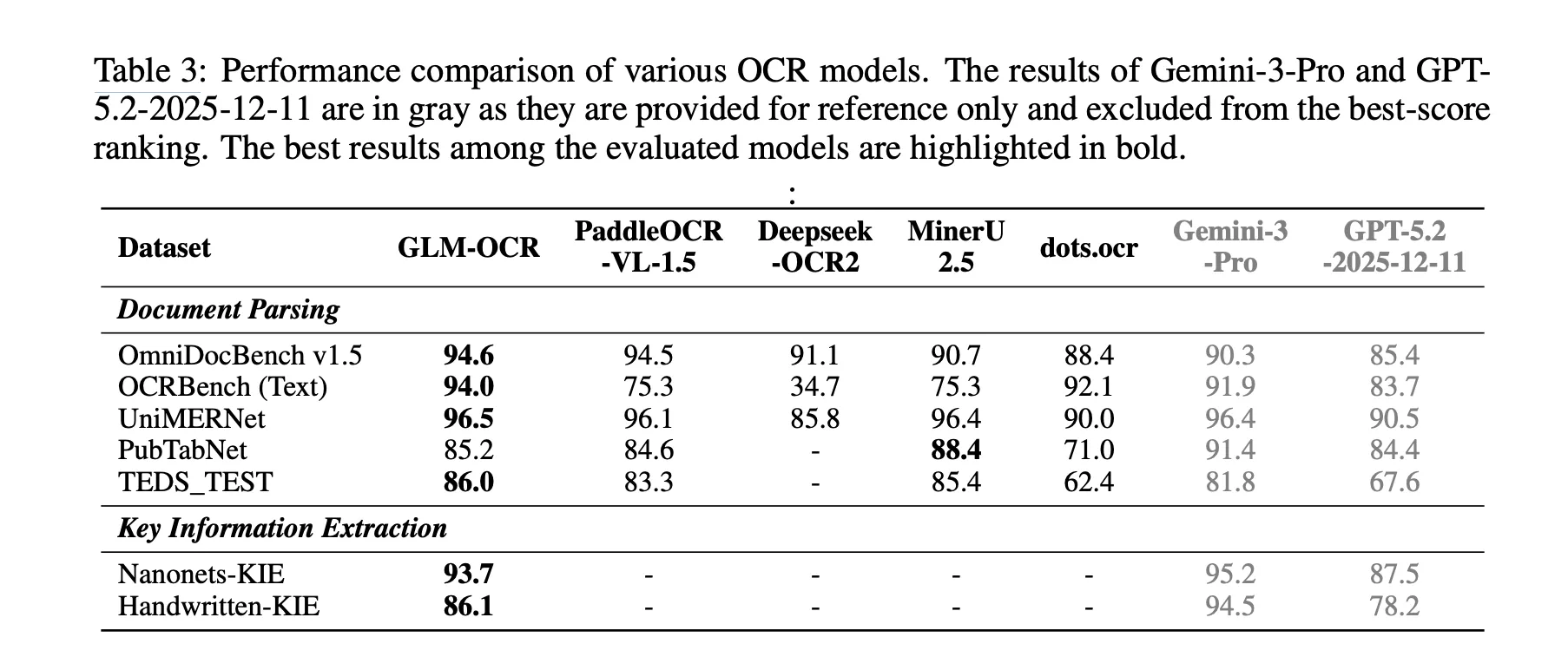 Why Document OCR Still Remains a […]
 -
admin wrote a new post 1 month ago
Excel 101: IF, AND, OR Functions and Conditional Logic ExplainedYou reading this tells me you wish to learn more about Excel. This article continues […]
-
admin wrote a new post 1 month ago
Garry Tan Releases gstack: An Open-Source Claude Code System for Planning, Code Review, QA, and ShippingWhat if AI-assisted coding became more […]
-
admin wrote a new post 1 month ago
How to Switch from ChatGPT to Claude Without Losing Any Context or MemoryI asked ChatGPT how it feels about the recent and viral AI trend of […]
-
admin wrote a new post 1 month ago
A Beginner’s Guide to Building Autonomous AI Agents with MaxClawMost AI tools forget you as soon as you close the browser window. The system […]
-
admin wrote a new post 1 month ago
Why physical AI is becoming manufacturing’s next advantageFor decades, manufacturers have pursued automation to drive efficiency, reduce costs, […]
-
admin wrote a new post 1 month ago
-
admin wrote a new post 1 month ago
-
admin wrote a new post 1 month ago
The Download: how AI is used for military targeting, and the Pentagon’s war on ClaudeThis is today’s edition of The Download, our weekday n […]
-
admin wrote a new post 1 month ago
Future AI chips could be built on glassHuman-made glass is thousands of years old. But it’s now poised to find its way into the AI chips used i […]
-
admin wrote a new post 1 month ago
AI vs Generative AI: Key Differences, Models, and Real-World UsesTools like ChatGPT, Gemini, and Claude pushed AI into everyday conversations. […]
-
admin wrote a new post 1 month ago
Anthropic Says AI is Not “Killing Jobs”, Shares New Way to Measure AI Job ImpactThis is not another of those ‘AI is killing jobs’ reports. Ant […]
-
admin wrote a new post 1 month ago
Protecting cities with AI-driven flash flood forecastingClimate & Sustainability
-
admin wrote a new post 1 month ago
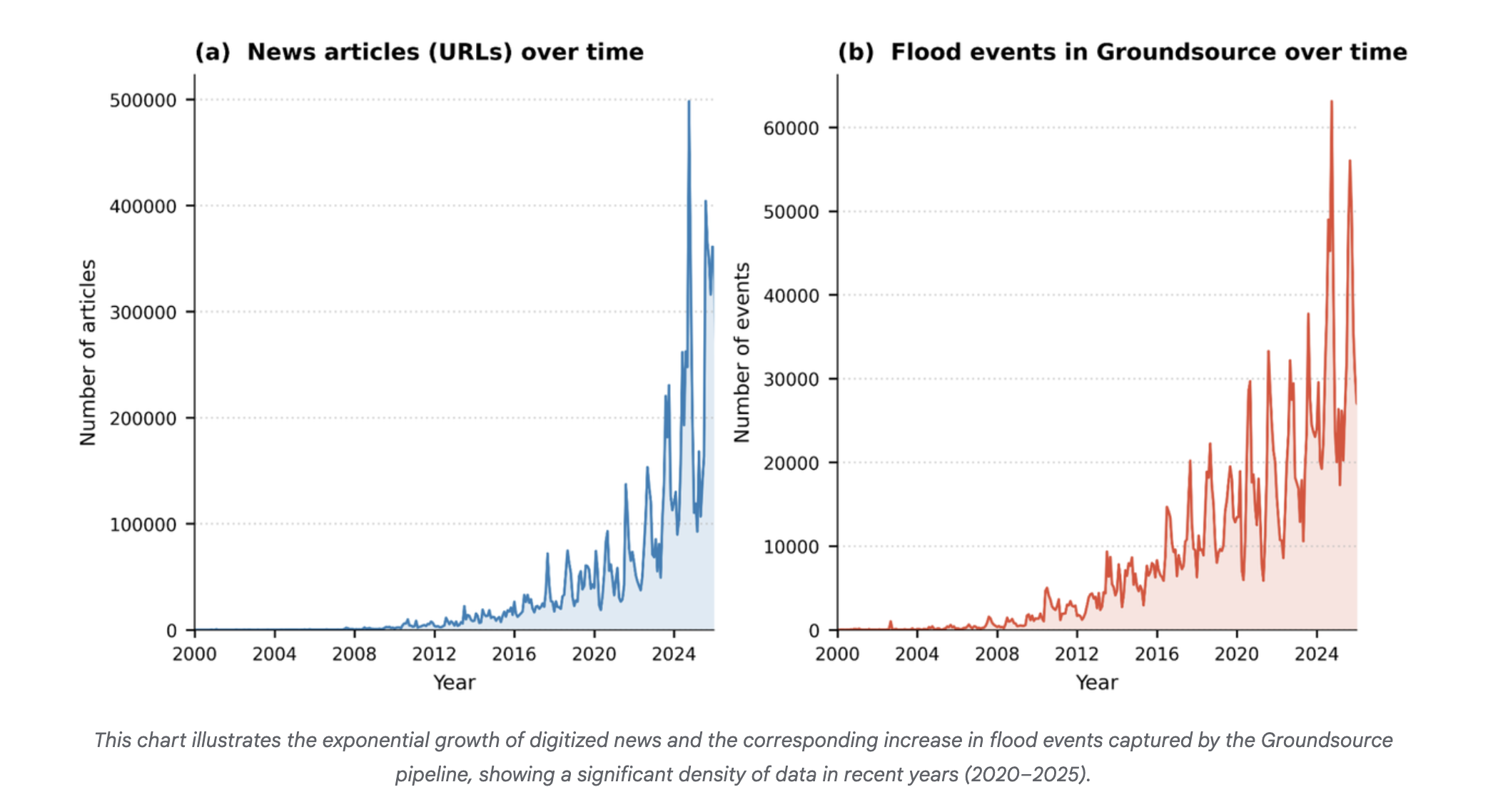
Introducing Groundsource: Turning news reports into data with GeminiClimate & Sustainability
-
admin wrote a new post 1 month ago
How to Build an Autonomous Machine Learning Research Loop in Google Colab Using Andrej Karpathy’s AutoResearch Framework for Hyperparameter Discovery and Experiment TrackingIn this tutorial, we implement a Colab-ready version of the AutoResearch framework originally proposed by Andrej Karpathy. We build an automated experimentation pipeline that clones the AutoResearch repository, prepares a lightweight training environment, and runs a baseline experiment to establish initial performance metrics. We then create an automated research loop that programmatically edits the hyperparameters in train.py, runs new training iterations, evaluates the resulting model using the validation bits-per-byte metric, and logs every experiment in a structured results table. By running this workflow in Google Colab, we demonstrate how we can reproduce the core idea of autonomous machine learning research: iteratively modifying training configurations, evaluating performance, and preserving the best configurations, without requiring specialized hardware or complex infrastructure. Copy CodeCopiedUse a different Browserimport os, sys, subprocess, json, re, random, shutil, time from pathlib import Path def pip_install(pkg): subprocess.check_call([sys.executable, “-m”, “pip”, “install”, “-q”, pkg]) for pkg in [ “numpy”,”pandas”,”pyarrow”,”requests”, “rustbpe”,”tiktoken”,”openai” ]: try: __import__(pkg) except: pip_install(pkg) import pandas as pd if not Path(“autoresearch”).exists(): subprocess.run([“git”,”clone”,”https://github.com/karpathy/autoresearch.git”]) os.chdir(“autoresearch”) OPENAI_API_KEY=None try: from google.colab import userdata OPENAI_API_KEY = userdata.get(“OPENAI_API_KEY”) except: OPENAI_API_KEY=os.environ.get(“OPENAI_API_KEY”) if OPENAI_API_KEY: os.environ[“OPENAI_API_KEY”]=OPENAI_API_KEY We begin by importing the core Python libraries required for the automated research workflow. We install all necessary dependencies and clone the autoresearch repository directly from GitHub, ensuring the environment includes the original training framework. We also configure access to the OpenAI API key, if available, allowing the system to optionally support LLM-assisted experimentation later in the pipeline. Copy CodeCopiedUse a different Browserprepare_path=Path(“prepare.py”) train_path=Path(“train.py”) program_path=Path(“program.md”) prepare_text=prepare_path.read_text() train_text=train_path.read_text() prepare_text=re.sub(r”MAX_SEQ_LEN = d+”,”MAX_SEQ_LEN = 512″,prepare_text) prepare_text=re.sub(r”TIME_BUDGET = d+”,”TIME_BUDGET = 120″,prepare_text) prepare_text=re.sub(r”EVAL_TOKENS = .*”,”EVAL_TOKENS = 4 * 65536″,prepare_text) train_text=re.sub(r”DEPTH = d+”,”DEPTH = 4″,train_text) train_text=re.sub(r”DEVICE_BATCH_SIZE = d+”,”DEVICE_BATCH_SIZE = 16″,train_text) train_text=re.sub(r”TOTAL_BATCH_SIZE = .*”,”TOTAL_BATCH_SIZE = 2**17″,train_text) train_text=re.sub(r’WINDOW_PATTERN = “SSSL”‘,’WINDOW_PATTERN = “L”‘,train_text) prepare_path.write_text(prepare_text) train_path.write_text(train_text) program_path.write_text(“”” Goal: Run autonomous research loop on Google Colab. Rules: Only modify train.py hyperparameters. Metric: Lower val_bpb is better. “””) subprocess.run([“python”,”prepare.py”,”–num-shards”,”4″,”–download-workers”,”2″]) We modify key configuration parameters inside the repository to make the training workflow compatible with Google Colab hardware. We reduce the context length, training time budget, and evaluation token counts so the experiments run within limited GPU resources. After applying these patches, we prepare the dataset shards required for training so that the model can immediately begin experiments. Copy CodeCopiedUse a different Browsersubprocess.run(“python train.py > baseline.log 2>&1″,shell=True) def parse_run_log(log_path): text=Path(log_path).read_text(errors=”ignore”) def find(p): m=re.search(p,text,re.MULTILINE) return float(m.group(1)) if m else None return { “val_bpb”:find(r”^val_bpb:s*([0-9.]+)”), “training_seconds”:find(r”^training_seconds:s*([0-9.]+)”), “peak_vram_mb”:find(r”^peak_vram_mb:s*([0-9.]+)”), “num_steps”:find(r”^num_steps:s*([0-9.]+)”) } baseline=parse_run_log(“baseline.log”) results_path=Path(“results.tsv”) rows=[{ “commit”:”baseline”, “val_bpb”:baseline[“val_bpb”] if baseline[“val_bpb”] else 0, “memory_gb”:round((baseline[“peak_vram_mb”] or 0)/1024,1), “status”:”keep”, “description”:”baseline” }] pd.DataFrame(rows).to_csv(results_path,sep=”t”,index=False) print(“Baseline:”,baseline) We execute the baseline training run to establish an initial performance reference for the model. We implement a log-parsing function that extracts key training metrics, including validation bits-per-byte, training time, GPU memory usage, and optimization steps. We then store these baseline results in a structured experiment table so that all future experiments can be compared against this starting configuration. Copy CodeCopiedUse a different BrowserTRAIN_FILE=Path(“train.py”) BACKUP_FILE=Path(“train.base.py”) if not BACKUP_FILE.exists(): shutil.copy2(TRAIN_FILE,BACKUP_FILE) HP_KEYS=[ “WINDOW_PATTERN”, “TOTAL_BATCH_SIZE”, “EMBEDDING_LR”, “UNEMBEDDING_LR”, “MATRIX_LR”, “SCALAR_LR”, “WEIGHT_DECAY”, “ADAM_BETAS”, “WARMUP_RATIO”, “WARMDOWN_RATIO”, “FINAL_LR_FRAC”, “DEPTH”, “DEVICE_BATCH_SIZE” ] def read_text(path): return Path(path).read_text() def write_text(path,text): Path(path).write_text(text) def extract_hparams(text): vals={} for k in HP_KEYS: m=re.search(rf”^{k}s*=s*(.+?)$”,text,re.MULTILINE) if m: vals[k]=m.group(1).strip() return vals def set_hparam(text,key,value): return re.sub(rf”^{key}s*=.*$”,f”{key} = {value}”,text,flags=re.MULTILINE) base_text=read_text(BACKUP_FILE) base_hparams=extract_hparams(base_text) SEARCH_SPACE={ “WINDOW_PATTERN”:[‘”L”‘,'”SSSL”‘], “TOTAL_BATCH_SIZE”:[“2**16″,”2**17″,”2**18”], “EMBEDDING_LR”:[“0.2″,”0.4″,”0.6”], “MATRIX_LR”:[“0.01″,”0.02″,”0.04”], “SCALAR_LR”:[“0.3″,”0.5″,”0.7”], “WEIGHT_DECAY”:[“0.05″,”0.1″,”0.2”], “ADAM_BETAS”:[“(0.8,0.95)”,”(0.9,0.95)”], “WARMUP_RATIO”:[“0.0″,”0.05″,”0.1”], “WARMDOWN_RATIO”:[“0.3″,”0.5″,”0.7”], “FINAL_LR_FRAC”:[“0.0″,”0.05”], “DEPTH”:[“3″,”4″,”5″,”6”], “DEVICE_BATCH_SIZE”:[“8″,”12″,”16″,”24″] } def sample_candidate(): keys=random.sample(list(SEARCH_SPACE.keys()),random.choice([2,3,4])) cand=dict(base_hparams) changes={} for k in keys: cand[k]=random.choice(SEARCH_SPACE[k]) changes[k]=cand[k] return cand,changes def apply_hparams(candidate): text=read_text(BACKUP_FILE) for k,v in candidate.items(): text=set_hparam(text,k,v) write_text(TRAIN_FILE,text) def run_experiment(tag): log=f”{tag}.log” subprocess.run(f”python train.py > {log} 2>&1″,shell=True) metrics=parse_run_log(log) metrics[“log”]=log return metrics We build the core utilities that enable automated hyperparameter experimentation. We extract the hyperparameters from train.py, define the searchable parameter space, and implement functions that can programmatically edit these values. We also create mechanisms to generate candidate configurations, apply them to the training script, and run experiments while recording their outputs. Copy CodeCopiedUse a different BrowserN_EXPERIMENTS=3 df=pd.read_csv(results_path,sep=”t”) best=df[“val_bpb”].replace(0,999).min() for i in range(N_EXPERIMENTS): tag=f”exp_{i+1}” candidate,changes=sample_candidate() apply_hparams(candidate) metrics=run_experiment(tag) if […]
- Load More

admin
Last active: Active 4 months ago
SHARE:
Comments: 0
Likes: 0
Submitted: 1312
Friends: 0
User Rating: Be the first one!

Adsterra
🔥 Top Offers (Limited Time)